
Skip to content
Your disk, explained

Make room.
Keep building.

A Mac storage analyzer for developers. Find the caches, builds and AI files taking up space, inspect what matters, then review every cleanup before anything moves to Trash.

Public early-access beta. Free forever, including future versions. Signed and notarized, no account, macOS 14+, Apple silicon.
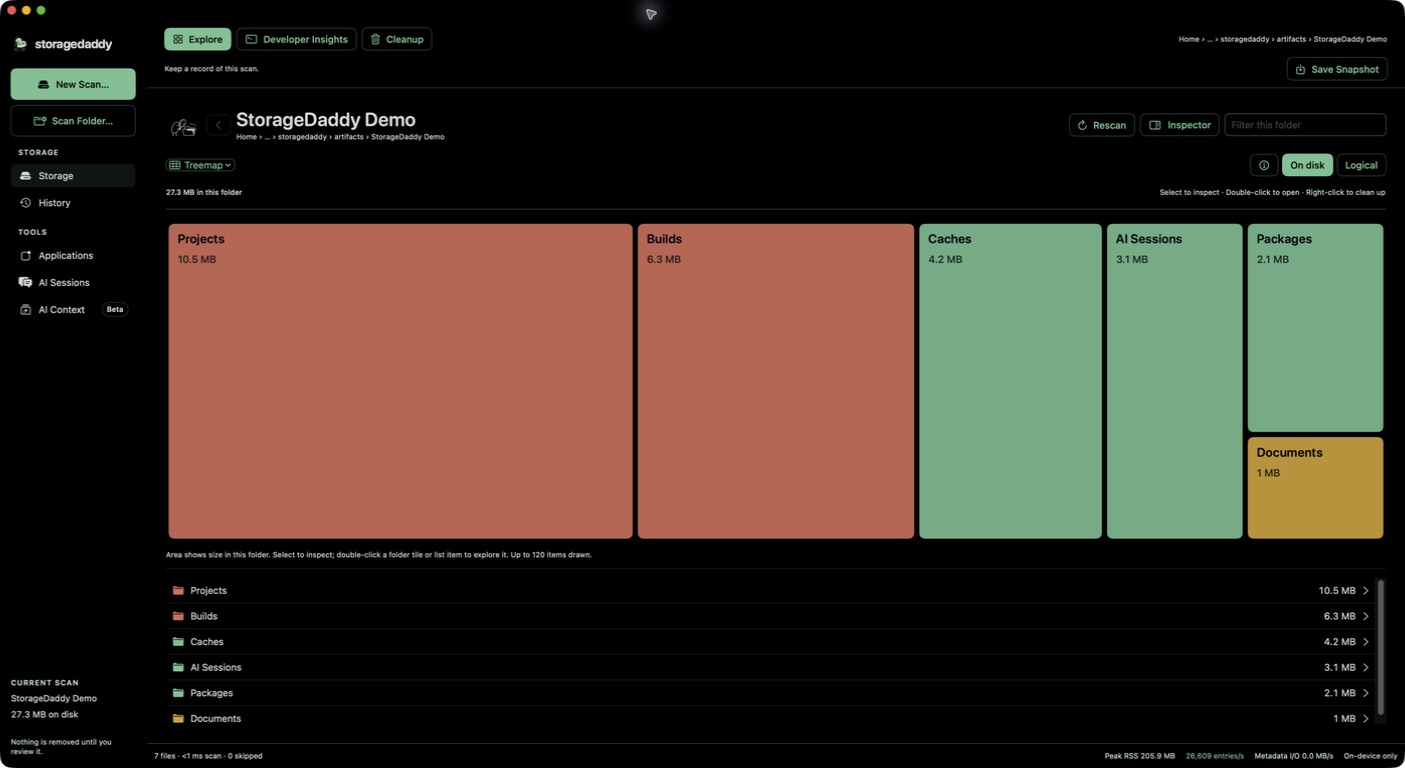
StorageDaddy storage explorer showing a sample folder tree and storage treemap
A real app capture of a sample folder. Scan results describe the selected area, not necessarily the entire volume.

Inspect, then decide

From full disk to a clear decision.

Follow the folder tree, inspect developer storage, and keep every cleanup behind a separate review.

Explore

Follow the space.

Browse live scan results, folder graphs and the inspector. Developer Insights highlights caches, build outputs, packages, node_modules, .git and AI storage. Save snapshots to compare later scans.

Understand

See your AI footprint.

Inspect recognized local Claude and Codex histories, skills and project context. Context-load estimates are not measurements of an agent’s entire runtime context. Selected session exports are reading archives, not resumable backups.

The cleanup rule

A scan deletes nothing.

Builds, caches, installed packages and agent histories accumulate quietly. StorageDaddy brings their sizes and locations into one native workspace.

Inspect first
Browse scan results, folder graphs and the inspector before choosing anything.
Review candidates
Add candidates, then review the list with local evidence and readable paths.
Confirm separately
Moving to Trash is its own explicit confirmation. StorageDaddy does not automatically empty Trash.

Your files stay on your Mac

Local scans. Explicit cleanup.

Scanning, previews and archive validation run locally. The native app has no file uploads. Optional App Health foreground-session heartbeats are disabled unless you configure a valid per-user native public key. Sparkle checks for updates over HTTPS; installation remains your choice.

Release status

For the Mac you build on.

The public beta is signed and notarized for Apple silicon Macs on macOS 14 or later. There is no trial expiry, account or checkout.

Made for
Developers who want to understand disk usage and review specific cleanup candidates, with local evidence and readable paths.
Not for
Automatic deletion, guaranteed reclaimed-space totals, an Intel build, or a replacement for a backup.

Before you make room.

Does storagedaddy upload my files?
Scanning, previews, and archive validation run locally on your Mac. The app makes no file uploads. Optional App Health foreground-session heartbeats are disabled unless you configure a valid per-user native public key. Heartbeats contain a temporary session identifier and active state, with no user/device identity, events, logs, filenames or scan details. Sparkle checks the update feed over HTTPS and downloads updates when you choose to install them. The website measures page visits, traffic sources, interaction patterns and download-button clicks with App Health and Microsoft Clarity, separately from aggregate download requests. Anonymous browser identifiers recognize repeat visits; website analytics do not receive your disk contents or app activity. Download counts do not prove installation or use.
What does it need Full Disk Access for?
macOS may limit what an app can see. storagedaddy works with the access you grant and explains when a folder could not be scanned. Full Disk Access is optional, but broader access gives a more complete map.
Is cleanup automatic?
No. You can select recognized caches for review, and moving anything to Trash requires a separate confirmation. Trash is still yours to empty.
How should I review developer caches and AI session history?
Example: a project’s node_modules and its Claude or Codex history are both large. Build 119’s published guidance labels dependencies Usually regenerable: check the project manifest, available versions and local edits before cleanup. It labels Claude and Codex history Not regenerable · archive first: reinstalling a tool cannot recover conversations. A build-folder name alone leaves regeneration unconfirmed. Inspect the source-backed decision example. This is a review example, not a reclaimed-space benchmark or a promise that an export can resume a session. Check the current release metadata.
What does an AI archive include?
Recognized Codex and Claude sessions can be exported as a compact, date-filtered reading and analysis archive. The ZIP and content hash are validated before you review originals. It is intentionally lossy: tool payloads, attachments, and reasoning may be omitted, and the result cannot resume the original session. Originals stay in place until a separate cleanup confirmation.
How do I install it?
Download the DMG, open it, then drag storagedaddy into Applications. Open the app and choose a disk or folder to scan. This beta supports Apple silicon Macs with macOS 14 or later; Intel Macs are not supported.
Why is Mac System Data large, and can storagedaddy show it?
Apple uses System Data for files that do not fit a more specific Storage category, including caches, logs and other system resources. It is a category, not a folder that storagedaddy can reproduce. Scan a disk or folder to find readable large files; Developer Insights can highlight builds and caches worth reviewing. Protected locations, snapshots and shared APFS storage can make the scan total differ from macOS Storage. Review every cleanup choice, and do not assume allocated bytes will become free space. See Apple’s storage guidance. On Macs with limited memory, download storagedaddy and start with a folder scan.
Is storagedaddy free and open source?
Everyone who downloads during early access gets all future versions free forever. There is no trial expiry, account, checkout or subscription. The published source remains available under the MIT license. Read the code, report an issue, or contribute on GitHub. Third-party libraries and provider artwork retain their own terms; see the repository notices.
Does scanning delete anything?
No. Add candidates, review the list, then explicitly confirm moving them to Trash. StorageDaddy does not automatically empty Trash.
Why can totals differ from macOS Storage?
Allocated and logical sizes differ. Shared APFS blocks, snapshots, protected files and scan scope also affect totals. Allocated bytes are not a guarantee of space reclaimed.
Do I need Full Disk Access?
It is optional and enables broader coverage. Protected or unreadable locations may still be skipped. A folder scan is a useful starting point.
What does early access cost?
The current beta is free. Everyone who downloads during early access gets future versions free forever. There is no account, checkout, subscription or trial expiry today.

Find the space.
Make the call.

Inspect first. Review candidates. Confirm separately.

macOS 14+ · Apple silicon · no account or checkout